
Your presentation is really important for your business. It is not a bunch of slides it is a way to convince people and tell a story, about your company. When you are trying to get people to invest in your business or teaching your team something your presentation needs to be good. If your presentation is good people will remember what you are trying to say about your company. Your presentation is a part of building your brand and getting your message across to people. Make your great Presentation
1. The Strategy: Why Presentation Design Matters
A good Presentation is like a bridge that helps people understand what you are trying to say. The Presentation is not something you look at it is a way to communicate with the people who are listening to you. A good presentation helps your audience understand your idea the presentation is a very important part of getting your main idea across, to the people who are listening.
-
Cognitive Load: Audiences cannot read and listen simultaneously; effective Presentation design minimizes text to keep focus on the speaker.
-
Visual Storytelling: Like a movie, every great presentation needs a beginning (problem), middle (climax/solution), and end (conclusion).
-
Professionalism: Consistent design elements—fonts, grids, and color palettes—communicate authority and attention to detail.
2. Leveraging Canva for Impactful Slides
Canva has really changed the way we make presentations. It is much easier now because Canva got rid of all the technical stuff that used to be a problem. We can just focus on making our presentations look great with Canva. Canva is a help when it comes to design.
-
Intuitive Workflow: The drag-and-drop interface allows you to build sophisticated layouts without needing formal training in complex design software.
-
Collaboration: Real-time editing allows teams to tag, comment, and refine a presentation together, avoiding version-control headaches.
-
AI-Powered Design: Tools like Magic Design and Magic Animate can jumpstart your creativity, helping you generate layouts from simple text prompts.
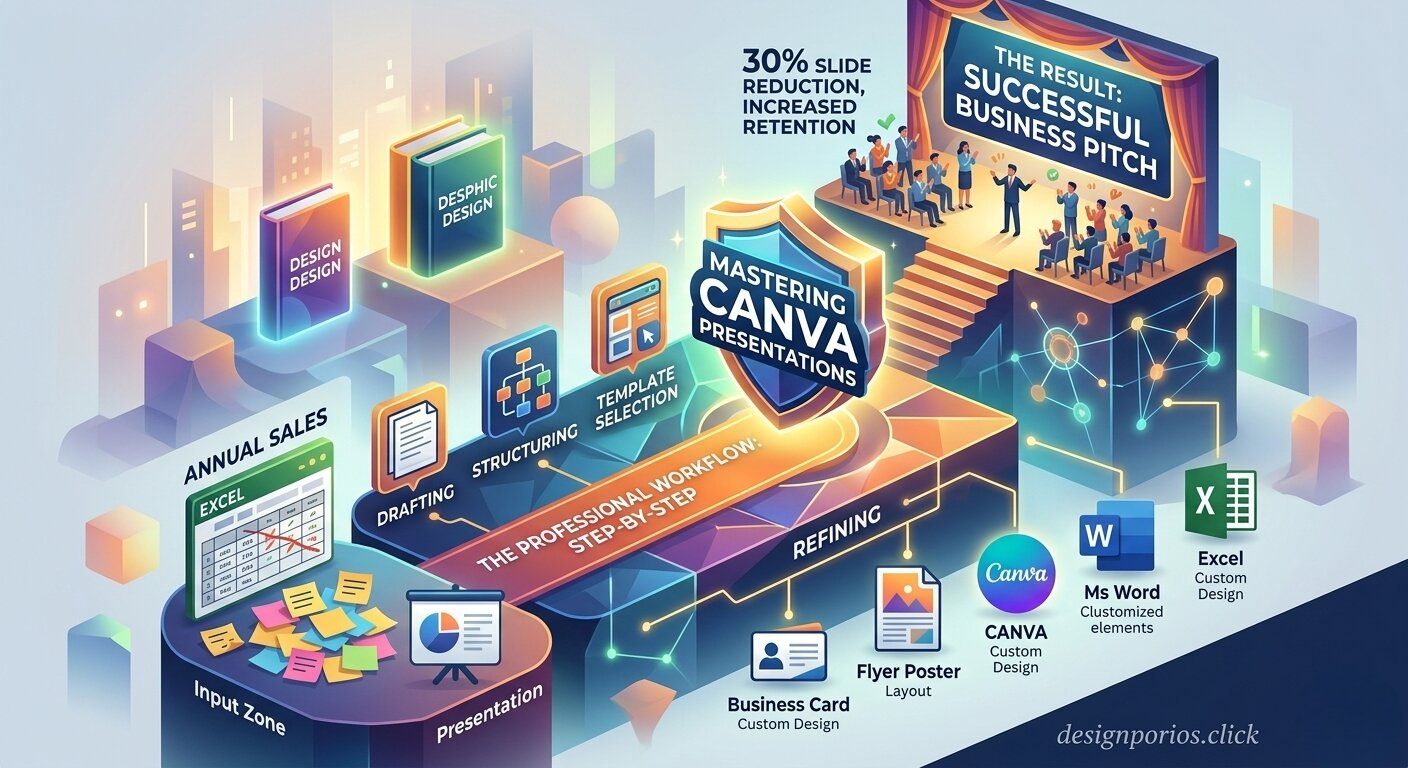
3. The Professional Workflow: Step-by-Step
Before jumping into the editor, follow this proven process to ensure your presentation is effective:
-
Drafting: Start with an outline and a script. Resist the urge to include everything you researched; focus only on the most essential information.
-
Structuring: Organize your presentation with a clear, logical flow where one topic leads intuitively to the next.
-
Template Selection: Pick a professional template to save time, but customize it with your specific brand colors, logos, and fonts to ensure consistency.
-
Refining: Use one idea per slide. Replace long sentences with concise keywords or bullet points.
4. Design Best Practices
To elevate your presentation, master these core principles:
-
Consistency is Key: Use the same font, grid, and background throughout for your Presentation. Think of your slides as “fraternal twins” rather than identical ones—varied but clearly related.
-
Visual Hierarchy: Establish a clear path for the reader’s eye. Use size and color to highlight the most important information.
-
High-Impact Imagery: Use Canva’s built-in stock photos and graphics to reinforce your story rather than just “decorating” the page.
5. Advanced Features to Elevate Your Presentation
Take your presentation beyond static slides by utilizing interactive features:
-
Presenter View: Keep your notes, timers, and slide previews private while the audience views only the main deck.
-
Canva Live: Engage your audience in real-time with Q&A sessions and interactive reactions.
-
Recording: Use the “Record” feature to narrate your slides, allowing people to watch your presentation on-demand.
6. How I Can Help You
As a dedicated graphics designer, I specialize in transforming disorganized ideas into polished, high-impact decks. I can help you with:
-
Brand Alignment: Applying your unique style guide across every slide in your presentation.
-
Technical Solutions: Resolving layout issues, cleaning up Excel data for visual charts, and ensuring your Word documents are print-ready.
-
Custom Design: Creating a bespoke presentation that tells your unique story effectively.